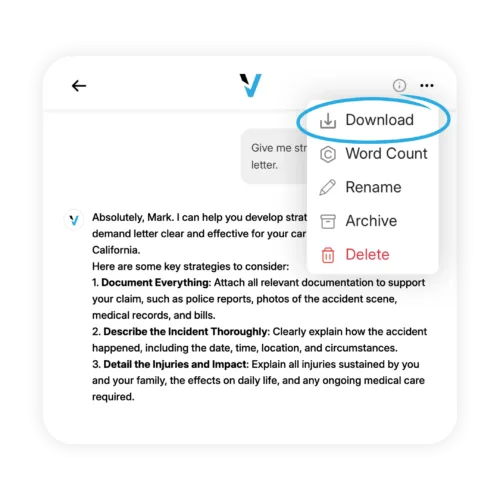
Export Conversations and Documents:Take Everything With You
Sometimes the Vikk AI conversation is the product: you asked a question, got an answer, and you are done. Other times, the conversation is the start of something that needs to leave the app. A demand letter you need to send. An analysis you need to show an attorney. A full conversation you need to preserve for your records. A generated NDA you need to send to a counterparty. Export makes all of that simple: anything inside Vikk AI can be exported in professional formats, in seconds, for free.
What You Can Export
Full conversations
Export any complete conversation as a structured PDF or DOCX file. The export preserves the chronological flow, your questions, Vikk AI's responses, any uploaded documents (referenced or attached), and any generated content.
Generated documents individually
When Vikk AI drafts a letter, contract, or other document, export just that document as a standalone PDF or DOCX ready to send.
Analyses
When Vikk AI provides a structured analysis (a clause-by-clause contract review, a Strategy Mode plan, a state-law summary), export the analysis as its own document, properly formatted and paginated.
Partial selections
Select a specific message, a sequence of messages, or a specific document from within a conversation and export just that.
Your entire archive
Export your full Vikk AI account history as a ZIP bundle of PDFs, JSON data, or a combination. Useful for backups, for moving to a personal archive, or for account closure.
Export Formats
The universal format. Preserves formatting exactly, is readable on any device, is suitable for printing, is acceptable for certified mail, and is accepted by courts and most professional recipients. Default format for most exports.
DOCX
Microsoft Word format. Best when you want to edit the document before sending. Useful for drafted documents that you want to revise, reformat, or add your own letterhead to.
Plain text
For inclusion in emails, for pasting into other documents, or for simple backup. No formatting.
JSON
Structured data export. Primarily useful for backups, for team use cases where you want to ingest Vikk AI content into other systems, or for developers working with the API.
Common Export Use Cases
Generate the demand letter in Vikk AI. Export as PDF. Print and send via certified mail. Or export as DOCX, apply your own letterhead in Word, convert to PDF, and send electronically. Either way, the export takes 10 seconds.
Before an attorney consultation, export the relevant conversations and analyses as PDF. Email to the attorney in advance. The attorney reviews your situation before the meeting. The meeting starts at full speed instead of at intake.
Export your drafted complaint, your generated demand letter, and your conversation analyses as PDFs. Attach to your small claims filing as evidence that you made a good-faith attempt to resolve the matter before filing.
At the end of a matter, export the complete conversation archive as a PDF bundle. Save to your personal cloud storage or print for a paper file. Your record of the matter is complete and portable.
For non-sensitive matters, you can share an exported Vikk AI analysis directly with the other party. Some users find that showing a landlord or employer an analysis helps establish that they have done their homework.
On Business and Enterprise plans, exports can be shared into team shared drives, added to case management systems, or distributed to relevant team members.
Frequently Asked Questions
-
Do exported documents include the Vikk AI branding?
You can choose. Default exports include a subtle Vikk AI attribution footer on the last page. You can export without branding for documents you are sending as your own (letters, contracts, etc.). Analyses and research exports retain attribution by default.
-
Are exports free on the free plan?
Yes. Exports are included on every plan, including Vikk Free. There is no per-export cost.
-
Is there a limit on export size or frequency?
No practical limit. You can export as much or as often as you need.
-
Are exports formatted for professional use?
Yes. Exported documents are properly formatted with margins, headers, and pagination appropriate for their type. Generated letters look like professional letters. Contracts look like professional contracts.
-
Can I export directly to cloud storage (Google Drive, Dropbox, etc.)?
Yes, via standard mobile and web share actions. Business and Enterprise plans can add direct integrations with specific cloud storage providers.
-
What happens to exported data?
Once exported, the file is on your device (or your cloud storage). Vikk AI does not retain control over exported copies. Treat exported documents the same way you treat any other sensitive document.
Take your work with you in any format. Start free.
Are you a Lawyer? Connect with our Users!